
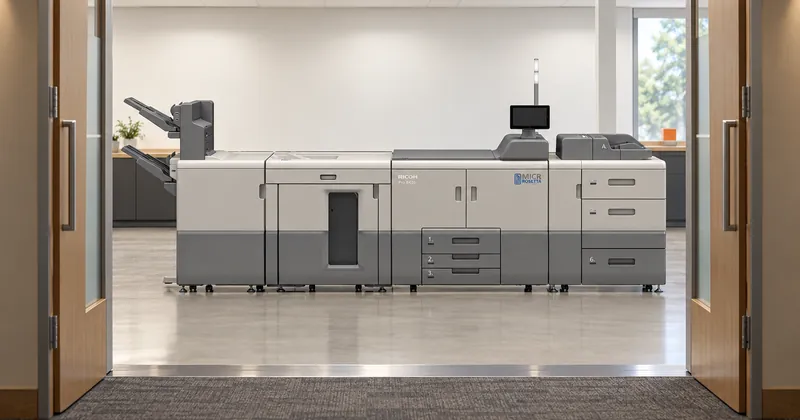
The line between workgroup and production falls at monthly volume, not at speed. Our workgroup printers top out at a recommended 53,000 pages a month, and our production systems start at a recommended 240,000. If your peak month fits comfortably under the first figure, you are a workgroup buyer, and the service plan, the room and the staffing all follow from that answer.
Speed is the number printed largest on both classes, so it is where most comparisons start. The workgroup class runs at 34 to 60 pages per minute. The production class is published at 95 to 136 pages per minute, with one footnote: the Pro C7500PM runs at 85 pages per minute as standard and reaches 95 with its optional speed upgrade. Those ranges tell you how long a run takes. They do not tell you which class you belong in.
The two classes by the numbers
Every model below is sized by a monthly figure. For six of them that figure is a recommended monthly volume. For the two monochrome production families it is a maximum monthly volume, which is a different kind of number, so read that column with care.
| Model | Class | Speed | Monthly figure |
|---|---|---|---|
| P 311M | Workgroup | 34 ppm | Up to 5,800 prints, recommended |
| P 501M | Workgroup | 45 ppm | Up to 10,000 prints, recommended |
| SP C840DNM | Workgroup | 45 ppm, color | Up to 50,000 pages, recommended |
| SP 8400DNM | Workgroup | 60 ppm | Up to 53,000 pages, recommended |
| Pro C7500PM | Production | 85 ppm, 95 with the speed upgrade | Up to 240,000 pages, recommended |
| Pro C7210XM | Production | 95 ppm | Up to 240,000 pages, recommended |
| Pro 8310M/8320M | Production | 111 or 136 ppm | Up to 1,000,000 impressions, maximum |
| Pro 8410M/8420M | Production | 111 or 136 ppm | Up to 1,000,000 impressions, maximum |
Look at the gap in the last column. Nothing in the line has a recommended volume between 53,000 and 240,000 pages a month. The bottom of production is more than four times the top of workgroup, which is why the decision is rarely close once you know your own number.
Finding your side of the line
The number to bring is your peak month, counted in pages, compared against the recommended monthly volume. Not your average month, and not the maximum duty cycle, which is a ceiling rather than a workload. We explain that distinction in recommended monthly volume versus maximum duty cycle, and why the busiest month is the one to plan for in a separate post on planning for your peak month.
Count every page the machine will print, not only the checks: remittance pages, stubs, reports and reprints all use the same engine. Then compare. As an example, a department whose peak month is 20,000 pages sits well inside the workgroup class. One whose peak month is 100,000 pages is nearly twice the top of it, and that is a production operation whatever its average looks like.

If you print for other organizations, the deciding number is the monthly total across all of them, not the largest single job. Many small clients can still add up to a workgroup operation. A few large ones usually do not.
What changes besides speed
Crossing into production changes the room and the routine as much as the output. These are the published differences worth putting in front of facilities and IT before anyone signs:
- Power. Workgroup models run on 120 to 127V. Production systems need 208 to 240V, and the Pro C7500PM uses two dedicated cords.
- Weight. The SP 8400DNM weighs 125.6 lbs including consumables. The Pro 8410M/8420M main unit weighs 911 lbs, and the Pro C7500PM main unit is rated at less than 1,235 lbs.
- Warm-up. The SP 8400DNM is ready in 21 seconds or less. The Pro C7500PM, Pro 8310M/8320M and Pro C7210XM each list a warm-up of less than 300 seconds, which suits a scheduled cycle better than a single manual check in the middle of the afternoon.
- Supplies. Workgroup toner comes as a cartridge or a bottle. The Pro 8310M/8320M take ProMark™ MICR toner in four-bottle kits rated at 350,000 impressions at 4% coverage, or a six-pack at 2.1 million.
- Installation. Every production MICR printer includes our three-step installation and MICR certification at no charge: a site survey weeks ahead, MICR conversion of the engine, and testing on an RDM Check Verifier against ANSI specifications.
Service plans follow the class
Our three service plans are divided along the same line. Exchange Warranty ships a replacement device when the first call cannot fix the problem, and it covers workgroup printers only, excluding the SP 8400DNM and the SP C840DNM. 4-Hour Response covers both classes, with a Ricoh authorized technician aiming to arrive within four hours during business hours, Monday to Friday, 8 to 5. 4-Hour Response, 24/7 covers production printers only.
That last point settles some decisions on its own. If your check run happens overnight and a failure at two in the morning has to be answered on site before the morning cutoff, the only plan with round-the-clock on-site coverage is a production plan. Technical support by phone is available 24 hours a day under every plan and with every printer purchase, but the on-site remedy behind it depends on the plan, and a plan has to be added at the time of purchase.

Who runs the machine
A workgroup MICR printer sits in the office with the people who run payroll or accounts payable, and they print on demand as part of their day. A production system is run as equipment. Our production installation ends with on-site training for the printer operators in basic operation, TCRU usage and MICR fundamentals, and the Pro 8310M/8320M are built with customer replaceable units so trained operators handle routine part changes rather than waiting on a service call.
So the staffing question is concrete: who will be trained, and who covers when they are away? If nobody in the organization has that role, that is worth knowing before the class is chosen. Our installation process defines which team is responsible for what during the site survey, weeks before the machine arrives.