
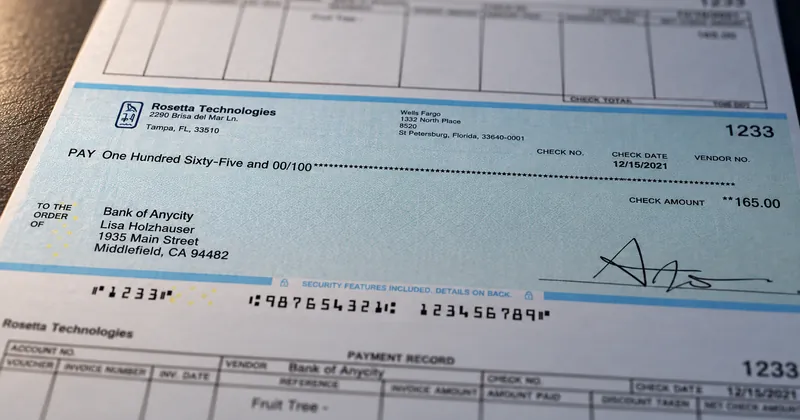
Photocopy a check that carries a VOID pantograph and the word VOID appears across the copy, even though nobody can see it on the original. On blank stock the pantograph is composed and printed in the same pass as the MICR line, which makes it part of every check rather than a property of a carton of paper.
A pantograph is one of the oldest printed security features on a check, and one of the most misunderstood. It is often described as if it made a check impossible to copy. It does nothing of the kind. What it does is narrower and still useful: it makes a copy announce itself to anyone who looks at it.
Two patterns that look like one
A pantograph is built from two patterns laid into the check background. One forms the hidden word. The other fills the space around it. They are drawn so that, at normal reading distance, the eye blends both into a single even tone, and the original shows nothing but a quiet background.
A copier does not see the way an eye does. It keeps some of the fine detail in an image and loses some, and the pantograph is designed so that the pattern forming the word and the pattern around it fare differently. On the copy, the word separates from its surroundings and becomes legible. The original never changes. Only the reproduction gives the game away.
That mechanism explains both the strength of the feature and its limit. It works because a copy is an imperfect reproduction, and it depends entirely on how imperfect a given device is. That is why a pantograph should be thought of as a deterrent and a visual cue rather than a lock.
Why it prints in the same pass as the MICR line
On pre-printed stock, the pantograph is part of what a stock supplier prints in advance, so it arrives with the inventory and stays the same until the inventory runs out. On blank stock, the software composes the background, the logo, the security features and the MICR line together, and the printer produces all of them at once. CheckStream® lists VOID pantograph among the security features it prints, and that one change has practical consequences.
- It appears on every check, for every account. One blank stock covers every account, so the pantograph belongs to the template rather than to one account's stock order. A small account gets the same protection as the main payroll account.
- It changes with the template. Moving the pantograph, changing its density or redrawing the area it covers is an edit to a file, not a reorder of paper and a trip to the shredder for the old stock.
- It has to respect the clear band. The MICR line sits in a reserved band along the bottom edge, and nothing else may print inside it. A background pattern is exactly the kind of artwork that drifts into that band unless the template keeps it out.
- It is checked on the same proof as everything else. Because the whole check is produced in one pass, one proof on the real stock shows the pantograph, the field positions and the MICR line together.
The third point deserves a moment. On a monochrome MICR printer, the background is printed with the same magnetic toner as the line itself, and anything magnetic printed in the reserved band becomes part of the signal the read head sees. A pantograph that strays into the band is a security feature turned into a reject. We cover that boundary in keeping security features away from the MICR line.
Where it goes on the check
A pantograph earns its place where a copy would be made from: the face of the check, behind the date, the payee, the amount and the signature. Covering the face rather than a corner means the word lands across the parts a copier would be used to reproduce.
On blank stock, CheckStream prints the VOID pantograph in the same pass as the bank details, logos and signature. On a monochrome printer, the feature prints as part of a black background. In both cases the pantograph is composed with the rest of the check rather than bought on the paper.
What a pantograph does not do
- It does not stop alteration of the genuine item. A pantograph reacts to copying, not to someone changing the payee or the amount on the original.
- It does not stop a counterfeit built from scratch. A forger who never copies your check never triggers the word. The counterfeit simply lacks your pantograph, which only matters if someone checks.
- It does not behave identically on every device. Copiers and scanners differ, and a careful reproduction may show the word faintly or not at all.
- It does not check itself. The word appears on a copy only for a person who looks at the copy and knows what it means.
None of that makes the feature pointless. It raises the effort and the skill a copy requires, and it gives anyone handling the item an obvious signal when a copy has been passed off as an original. It works best layered with features that answer different threats, such as microprint, a printed watermark and positive pay at the bank. The security feature checklist for a new check design sets out how to decide which belong on yours.