
How the line is organized
The MICR line is positioned along the bottom edge of the document in a reserved band. Nothing else may print in that band, because anything magnetic in it becomes part of the signal the read head sees.
Positions on the line are numbered from right to left, starting at position 1 at the far right edge of the document. That is the opposite of how a person reads it, and it is the convention the standard uses, so specifications and error messages from a reader/sorter will refer to positions in that direction.
Fields are separated by symbols rather than by spacing alone. E-13B has four of them, and they are what let a machine tell where one field ends and the next begins without counting characters.
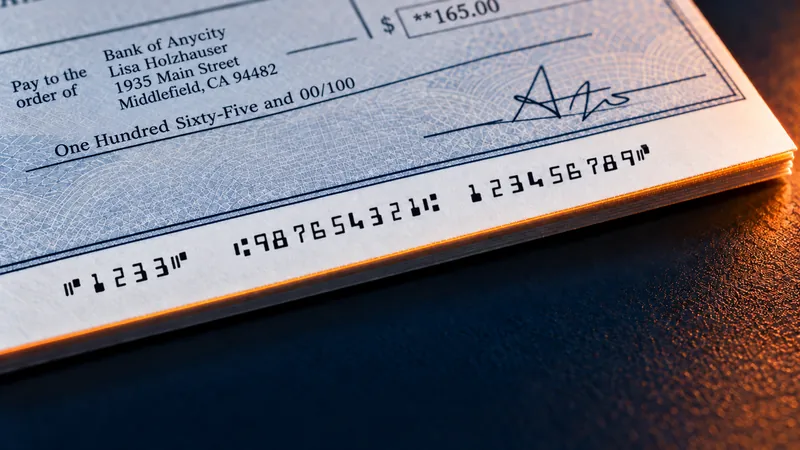
The MICR line on our demo check, left to right
- Auxiliary on-us field1233, the check number, bounded by On-Us symbols. Used mainly on business checks.
- Routing number987654321. Nine digits, the bank, bracketed by Transit symbols.
- On-us field123456789, the account, closed by an On-Us symbol. Its layout is set by the issuing bank.
- Amount fieldLeft blank when the check is printed. The bank of first deposit encodes it.
Printed in E-13B characters with magnetic toner. A reader/sorter reads this line by its magnetic signal rather than by the shape of the characters. A signal that is too weak, too strong or misshapen gets the item rejected.
The four E-13B symbols
E-13B has fourteen characters: the ten digits, and these four symbols. The symbols carry no numeric value. They are structural.
| Symbol | What it marks |
|---|---|
| Transit | Brackets the routing number on both sides, so the reader/sorter knows the nine digits between them are the bank identifier. |
| Amount | Brackets the amount field on both sides. The amount is added after the item reaches the bank, not when the check is written. |
| On-Us | Separates the account portion of the line. Its exact use varies between issuing banks. |
| Dash | A separator used inside a field, most often within an account number. |
Because the symbols bound their fields, a missing or misread symbol is worse than a missing digit. The reader/sorter loses its place on the line rather than losing one character.
What each field contains
Routing number
Nine digits identifying the financial institution the item is drawn on, bracketed by Transit symbols. This is the field that decides where the item goes, which makes it the one whose misreading causes the most disruption.
The last of the nine digits is a check digit calculated from the other eight. A reader/sorter can therefore detect many misreads of this field on its own, without reference to any external list, which is why routing number errors often surface as a rejection rather than as a misrouted item.
On-us field
The account number, and on many checks the check serial number as well. This field sits between the routing number and the amount field, and its internal layout is set by the issuing bank rather than by the standard. Two banks will lay out the same information differently, and both are correct.
This is the practical reason check printing software has to be configured per account rather than per company. The field is bank-specific.
Amount field
The amount of the item, bracketed by Amount symbols at the far right of the line. It is blank on a check when it is written and encoded later, by the first bank to handle it, in a step called amount encoding.
A check printed with an amount already in the MICR line is unusual outside specific applications. On a normal business check the amount field is empty at print time, and leaving space for it is part of getting the layout right.
Auxiliary on-us field
A field at the far left of the line, used mainly on business-size checks, most often to carry the check serial number. Personal checks frequently do not have one. When present it is bounded by On-Us symbols.
What goes wrong on the line
A reader/sorter rejects an item when it cannot resolve the line with confidence. In practice the causes cluster into a short list.
- Signal strength outside tolerance, because the toner is not magnetic enough, or the fuser is not bonding it properly
- A font that resembles E-13B but was not built to the specification, producing the wrong waveform
- Anything else printed inside the reserved band along the bottom edge
- Check stock containing ferromagnetic material, which adds signal the read head was not expecting
- Physical damage across the line: a fold, a staple hole, a tear, or a stamp
- Misregistration, where the line prints too high, too low, or too far along the sheet
The standards that govern it
Two bodies matter here. ASC X9 publishes the American National Standards that specify check documents and the MICR line on them, and the American Bankers Association is the authority behind the routing number system that the transit field carries.
Our printers produce output that complies with the ASC X9 and ABA specifications, and our MICR fonts are one of the five conditions attached to the MICR Performance Guarantee.
Check stock is governed separately, by ANSI X9.18, which specifies the physical paper rather than what is printed on it.
Two MICR font standards
E-13B
The North American standard
- Blocky characters of uneven mass
- Ten digits and four symbols: Transit, Amount, On-Us and Dash
CMC-7
Used across much of Europe and South America
- Seven bars per character
- The spacing between the bars encodes the character
Why the shapes look like that. Each character is shaped so that it produces a distinct waveform as it passes a magnetic read head. A visually similar font not built to that specification produces the wrong waveform, and the item is rejected.

Common questions
Which way is the MICR line numbered?
From right to left, with position 1 at the far right edge of the document. Specifications and reader/sorter messages use that direction, which is the opposite of how a person reads the line.
Why is the amount field empty on a printed check?
The amount is encoded later, by the first bank to handle the item, in a step called amount encoding. On a normal business check the field is blank at print time, and leaving the correct space for it is part of laying the line out properly.
What is the auxiliary on-us field for?
It sits at the far left of the line, is used mainly on business-size checks, and most often carries the check serial number. Personal checks frequently do not have one.
How many characters does E-13B have?
Fourteen: the ten digits, plus four symbols named Transit, Amount, On-Us, and Dash. The symbols bound the fields so a reader/sorter can tell where each one starts and ends.
Can anything else print along the bottom of a check?
Not inside the reserved band the MICR line occupies. Anything magnetic printed there becomes part of the signal the read head sees, and non-magnetic marks in the band can still interfere physically.
Does every bank lay the on-us field out the same way?
No. The internal layout of the on-us field is set by the issuing bank rather than by the standard, which is why check printing software is configured per account rather than once per company.
Talk it through with someone who builds these
We supply the printer, the software, and the toner, which is what makes the MICR Performance Guarantee possible at all. If any part of this applies to what you are trying to do, the fastest route is a conversation.